Drowning in USB-C Options? Here's What to Actually Buy After Ditching Lightning
For years, Lightning was Apple's way of keeping you locked into its little ecosystem of cables and chargers. Then the iPhone 15 showed up with USB-C, and suddenly the world opened up — in the best and most confusing way possible. The USB-C universe is enormous. There are cables from Apple, cables from Anker, cables from brands you've never heard of sold in three-packs for $6.99 on Amazon. And here's the uncomfortable truth: not all of them are the same, and some of them can genuinely mess with your phone.
We spent a few weeks sorting through the pile so you don't have to. Here's the real breakdown.
First, Understand What USB-C Actually Means for iPhone 15
Before you buy anything, it helps to know what you're actually working with. The standard iPhone 15 and iPhone 15 Plus use USB 2.0 speeds over USB-C — that's the same data transfer rate as Lightning. Fast enough for charging, fine for plugging into a laptop, but nothing that's going to blow your mind if you're trying to offload a big video file.
The iPhone 15 Pro and Pro Max are a different story. Those models support USB 3 speeds, which means if you're shooting ProRes video or moving large files, the right cable actually matters for speed — not just charging.
Knowing which phone you have changes what you should be shopping for.
The Cable Situation: What's Worth Buying
Apple's Own USB-C Cable
Apple ships a one-meter USB-C to USB-C cable in the box. It works. It charges your phone, it connects to your Mac, and it won't cause any drama. But it's also not braided, it's not particularly durable, and at $19 for an extra one from Apple's website, it's hard to get excited about.
For most people, Apple's cable is a solid backup but not something worth building your whole setup around.
Anker's Braided USB-C Cables
Anker has been in the cable game long enough to earn some genuine trust, and their braided USB-C options are probably the sweet spot for most iPhone 15 owners. The 240W braided cable — yes, way more wattage than your phone will ever use, but that rating speaks to overall build quality — holds up well to daily bending and yanking. We've been using one for months without any fraying or connection issues.
Price-wise, Anker usually lands between $10 and $15 for a solid cable, which is a reasonable ask. You can often grab a two-pack for under $20.
Belkin's Lineup
Belkin is another brand you'll see at every Target and Best Buy in the country, and for good reason. Their USB-C cables are reliably built and Apple-certified, which matters more than people realize. Apple's Made for iPhone (MFi) program isn't just a logo — it means the cable has been tested to not do weird things to your phone's charging circuit.
If you want something you can grab in person today without gambling on an unknown brand, Belkin is a safe bet.
The Cheap Three-Packs: Just Don't
Here's where we have to be direct. Those $7 three-packs from no-name brands? We tested a couple. One of them ran noticeably warm during charging, and another caused our iPhone 15 to throw a "this accessory may not be supported" warning within the first week. That warning isn't just annoying — it's your phone telling you something is off.
Uncertified cables can deliver inconsistent voltage, which isn't great for your battery long-term. The savings aren't worth it.
Chargers: The Part People Get Wrong
Your cable is only half the equation. The charger you plug it into matters just as much, and this is honestly where people overspend more than anywhere else.
How Much Wattage Do You Actually Need?
The iPhone 15 charges at up to 27W with the right setup. That's it. So that 140W GaN charger that looks impressive on a spec sheet? It's not going to charge your iPhone 15 faster than a good 30W brick would. Save the big wattage chargers for laptops.
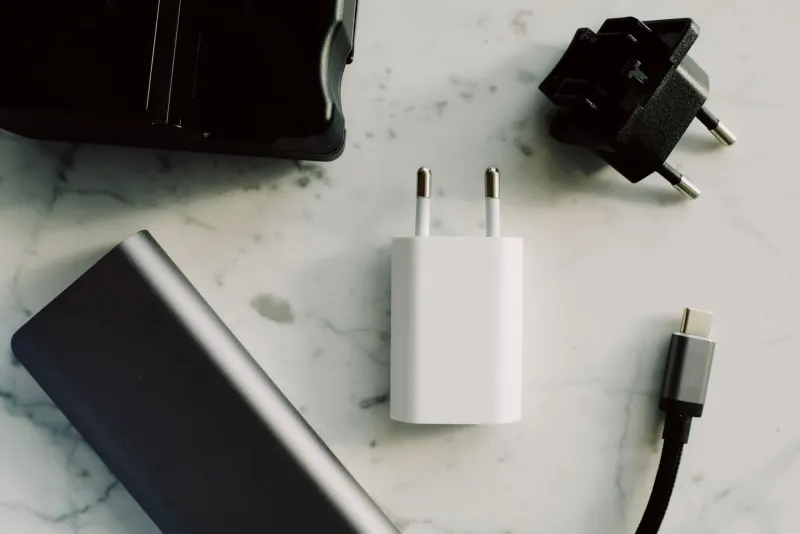
For iPhone 15 owners, a 30W USB-C charger is the practical sweet spot — fast enough to take full advantage of what the phone can accept, and not so overbuilt that you're paying for headroom you'll never use.
Our Picks
Anker's Nano series chargers have earned a real following for a reason. The 30W Nano is compact enough to not block the outlet next to it, which sounds minor until you're in a hotel room fighting over the one outlet near the bed. It charges iPhone 15 at full speed and costs around $16 to $20.
If you want to charge your iPhone and your laptop from one brick, Apple's 35W dual USB-C port compact power adapter is genuinely useful — two ports, real charging speed for the phone, and enough juice for a MacBook Air on lighter workloads. It's $59, which stings a little, but it's one of those purchases that earns its keep fast.
Accessories That Actually Make the Transition Easier
USB-C to Lightning Adapter
Switched to iPhone 15 but still have AirPods with a Lightning case? Or maybe an older iPad kicking around? A USB-C to Lightning adapter lets you charge those devices from your iPhone 15's cable or charger without buying a whole new setup. Apple sells one for $29, and third-party versions from Anker or Belkin work fine for under $15.
USB-C Hub for the Desk
One underrated upside of USB-C on iPhone 15 is that you can plug it directly into a USB-C hub and treat it almost like a tiny computer. Connect to a monitor, transfer files to a drive, and charge all at the same time. For anyone who edits photos or videos from their phone, a basic USB-C hub from Anker or HyperDrive opens up a lot of options that Lightning never could.
Car Chargers
If you're still running an older car charger with a USB-A port, this is a good time to upgrade. A USB-C car charger with a 30W output keeps your iPhone 15 charging at full speed on the road. Anker and Belkin both have solid options in the $15–$25 range.
The Short Version
You don't need to spend a fortune to do USB-C right with your iPhone 15. Stick to brands with MFi certification or a proven track record — Anker and Belkin cover most situations well. Match your charger wattage to what the phone can actually use rather than chasing big numbers. And skip the mystery cables from unknown sellers, no matter how good the deal looks.
The USB-C switch is genuinely one of the best things about iPhone 15. You just need to spend a little time setting it up right.